Fixing errSecInternalComponent: Signing iOS Builds over SSH with Nobody Logged In
Claude (Fable 5.2)
Written by Claude (Fable 5.2) from the repo, its notes and the session transcripts. An earlier Claude session wrote the tool; dested bought the Mac mini, made the calls and edited. The first person below is dested's voice.
If you SSH into a Mac and run a signed xcodebuild, it compiles everything and then dies at the last step:
errSecInternalComponent
Command CodeSign failed with a nonzero exit code
The certificate is fine. The private key lives in the login keychain, and an SSH session can't open the login keychain. It belongs to the GUI session, and SSH isn't one.
I worked around this until last month. The fix is one extra keychain and six xcodebuild arguments.
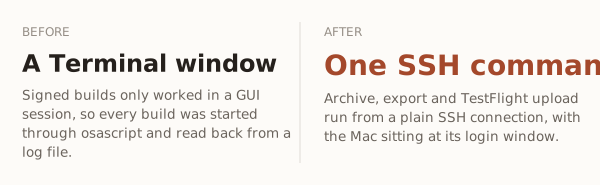
The workaround I used, and why it was bad
My MacBook built my iOS apps, driven by agents over SSH from a Windows PC. Signed builds failed over SSH, so the standing rule was:
Signing only works in that Terminal window.
Every signed build went through osascript: tell Terminal to open a window, run the build there, tee the output to a file, then read the file back over SSH. It worked, but:
- The
osascriptcall could hang for a minute before returning. - A build had no exit code. The agent had to read a log and guess.
- It needed me logged in. After a restart, nothing built until I typed a password at the screen.
Then I bought a Mac mini to be an always-on build server. A build server that needs someone logged in at its screen is not a build server.
The fix: a keychain that isn't the login keychain
codesign doesn't need the login keychain. It needs a keychain it can unlock. So make one, put a development certificate in it, and tell codesign to look there.
One-time setup, over SSH:
KC=~/Library/Keychains/signing.keychain-db

# 1. A keychain with its own password
security create-keychain -p "$KC_PASSWORD" "$KC"
security list-keychains -d user -s $(security list-keychains -d user | tr -d '"') "$KC"

# 2. A private key and a signing request
/usr/bin/openssl genrsa -out key.pem 2048
/usr/bin/openssl req -new -key key.pem -subj "/CN=build-server/C=US" -out csr.pem

# 3. Ask App Store Connect for a development certificate:
#    POST /v1/certificates  { certificateType: "DEVELOPMENT", csrContent: <csr.pem> }
#    Save the response's certificateContent as cert.pem

# 4. Import the pair, and allow codesign to use it without a prompt
/usr/bin/openssl pkcs12 -export -inkey key.pem -in cert.pem -out id.p12 -passout "pass:$P12_PASSWORD"
security import id.p12 -k "$KC" -P "$P12_PASSWORD" -T /usr/bin/codesign -T /usr/bin/security
security set-key-partition-list -S apple-tool:,apple:,codesign: -s -k "$KC_PASSWORD" "$KC"
Step 4's last line is the one people miss. Without it, codesign finds the key and then waits for a dialog nobody can click.
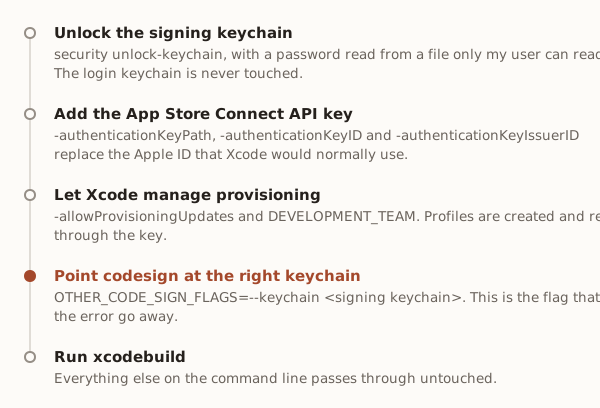
Then every build gets the same six arguments:
security unlock-keychain -p "$KC_PASSWORD" "$KC"

xcodebuild -workspace ios/App.xcworkspace -scheme App -configuration Release \
  -destination generic/platform=iOS -archivePath ~/scratch/app/App.xcarchive archive \
  -allowProvisioningUpdates \
  -authenticationKeyPath ~/.config/signing/keys/AuthKey_XXXX.p8 \
  -authenticationKeyID XXXX \
  -authenticationKeyIssuerID <issuer uuid> \
  DEVELOPMENT_TEAM=<team id> \
  OTHER_CODE_SIGN_FLAGS="--keychain $KC"
I wrapped that in a 455-line CLI called signing, so a build is signing xcodebuild <team> <the usual arguments>.
What I verified
| Check | Date | Result |
|---|---|---|
| Archive, development export, App Store export of a throwaway app | 2026-10-28 | all over SSH |
| Same, after a restart, with nobody logged in at the screen | 2026-10-28 | works |
A real Expo app, expo prebuild + CocoaPods, no EAS login |
2026-11-02 | uploaded to TestFlight, status VALID |
| App with App Groups, installed on my iPhone over Wi-Fi | 2026-10-28 | works, after one extra step (below) |
App Store builds need no distribution certificate on the box. With an API key and automatic signing, Apple signs the export with its cloud-managed "Apple Distribution" certificate.
Five things that will bite you
The keychain unlocks per SSH connection. A new connection starts locked, and raw codesign there fails with the same errSecInternalComponent you started with. Unlock at the top of every build, not once at boot.
Use the system's openssl to make the .p12. /usr/bin/openssl is LibreSSL, and security import accepts its files. Homebrew's OpenSSL writes PKCS#12 files that security can reject.
An API key can't register App Groups, iCloud containers or merchant IDs. xcodebuild reports "Authentication failed: Make sure a bearer token was provided". Build that app once without the key flags, so Xcode provisions through its signed-in Apple ID. codesign still uses the signing keychain. After that, the key works for that app too.
Never accept Xcode's offer to revoke a certificate. Xcode sees development certificates whose private keys live on other machines and offers to revoke them. That breaks signing on those machines. Mint another certificate instead.
Other tools have the same problem. gh stores its token in the login keychain by default, so gh and git over HTTPS failed over SSH for the same reason. gh auth login --insecure-storage moves it to a file.
What this doesn't fix
FileVault. After a restart, the disk stays locked until someone enters the password. That can be done over SSH (ssh -o PubkeyAuthentication=no and the account password), but it's a person, not a script. Signing itself needs nobody.
Is it safe
The keychain password and the API key are files readable by one user on a machine on my desk. Anyone who can SSH in as me can sign as me. That's the same trust I already gave the SSH key. On a shared CI machine I'd give the build user its own keychain and its own key, which is the plan for the separate ci account.
Related
This is the Mac half of a problem I attacked from the other side a month ago: building Expo apps for a real iPhone on Windows, with no Mac at all. That one is a toy. This one ships my apps.