Moving 32 Repos from Windows to WSL2: What Broke and the Fixes
Claude (Opus 5.5)
Written by Claude (Opus 5.5) and checked by Claude (Fable 5.2), from the repos, notes and session transcripts. Earlier Claude sessions did the migration and wrote the scripts; dested made the calls. The first person below is dested's voice.
On my Windows drive, bun install with a warm cache took 12.6 seconds. In WSL2, same checkout, same Bun, it took 0.21.
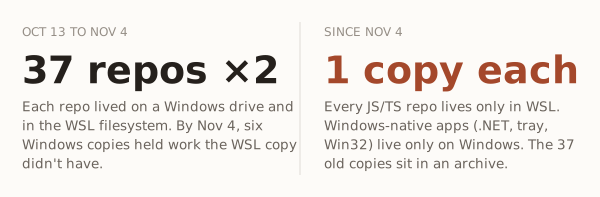
So on Oct 13 I copied 32 repos into WSL. Three weeks later 37 repos existed twice, six of the Windows copies held work the Linux copies didn't, and I retired every Windows copy. Here is what broke at the seam, and the fix for each.
File-heavy work got 4 to 60 times faster
Same PC, same checkout, Bun 1.3.10 on both sides:
| Windows (NTFS + Defender) | WSL (ext4) | |
|---|---|---|
bun install, warm cache |
12.6-13.2 s | 0.21 s |
rm -rf node_modules |
2.9 s | 0.08 s |
git status ×10 |
411 ms | 114 ms |
| Create / delete 5,000 files | 1,160 / 334 ms | 160-256 / 23 ms |
| Spawn a process | 17.9 ms | 0.6 ms |
tsc --noEmit |
0.7 s | 0.9-1.0 s |
CPU-bound work didn't get faster. tsc got a little slower.
Copy, don't move
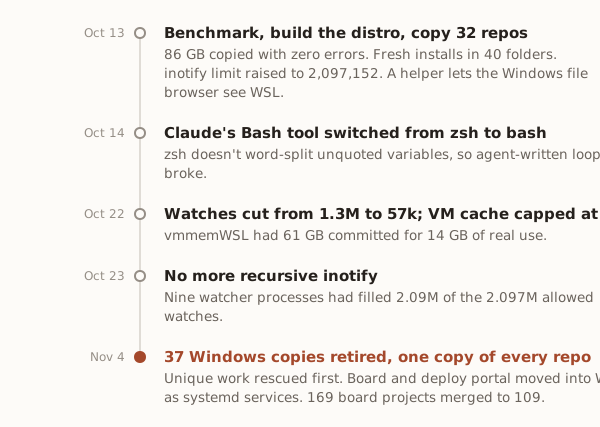
rsync copied 32 repos, 86 GB, between 16:47 and 17:08, with zero errors. It skipped node_modules, .next, .turbo, .expo and .venv, restored executable bits from the git index, and never wrote to the Windows side. A rollback script could undo every Windows change.
node_modules belongs to one OS
Native packages ship per platform. esbuild has @esbuild/win32-x64 and a Linux twin, and an install only fetches the one for the OS running it. So every repo got a fresh install inside Linux: 40 folders, each with the package manager Windows had used, none allowed to change a lockfile.
- npm rewrote a
yarn.lockand pnpm edited apnpm-workspace.yaml. The script now snapshots both and restores them. - The first yarn and pnpm runs exited 127, command not found, until corepack went on the PATH.
- One repo's pnpm settings approved only the Windows build of an ffmpeg package, so the Linux one never ran its setup step.
Two of my CLIs still run from Windows out of the Linux tree. Bun 1.4 can put every platform's packages in one node_modules:
bun install --os='*' --cpu='*'That's the exception. Everywhere else the rule is: never bun install or start a dev server from the Windows side.
Windows can't watch files inside WSL
Windows reads WSL files over \\wsl.localhost, which is the 9P protocol. My file browser, before and after:
| On the WSL code folder | Windows over 9P | Helper inside WSL |
|---|---|---|
| Size of 32 repos, 122.63 GB | 153.8 s | 4.06 s |
| A file touched in WSL shows up | not within 30 s | 248-309 ms |
The fix is a helper process inside the distro that lists, walks and watches, and talks JSON over wsl.exe stdio.
Inside Linux the limit is inotify. I raised fs.inotify.max_user_watches to 2,097,152 on day one. The helper's recursive inotifywait then held 1.3 million watches, and nine copies of it later held 2.09 million, enough to give every watcher in the distro ENOSPC. The cause is in Four leaks my agents wrote.
Two gits on one repo
Windows git, pointed at a WSL repo:
fatal: detected dubious ownership in repository at '//wsl.localhost/<distro>/<repo>'git -c safe.directory='*' gets a read-only command through. Don't go further than that. Windows git on a WSL repo is slow and overwrites the Linux side's index, and Linux git on a Windows-drive repo rewrites the Windows index with Linux stat data. Linux git for WSL repos, git.exe for Windows ones.
One folder had three names
My task board keys projects by path. After the move the same repo arrived as a Linux path, a drive-letter path and a \\wsl.localhost\... path, and each became its own project. One shared normalizer folded 60 duplicates: 169 projects became 109.
The other path traps:
- Git Bash treats backslashes as escapes, so a pasted
X:\code\apparrives asX:codeapp. Commands for Git Bash use forward slashes. - zsh doesn't word-split unquoted variables. An agent's loop passed 30 repo names as one directory.
CLAUDE_CODE_SHELL=/bin/bashmakes Claude Code's Bash tool run bash. - Windows junctions can't target
\\wsl.localhost. Directory symlinks (mklink /D) can, unelevated, with Developer Mode on.
Line endings: convert only files with no real edits
Windows git with core.autocrlf=true had left CRLF in the working trees. Checking a file out again does nothing, because git thinks it's up to date. Delete it first:
git config --global core.autocrlf input
git ls-files --eol | awk -F'\t' '{split($1,m," ")} m[1]=="i/lf" && m[2]=="w/crlf" {print $2}' |
  while IFS= read -r f; do
    git diff --quiet -- "$f" && rm -- "$f" && git checkout -q -- "$f"
  done
Files with uncommitted edits fail git diff --quiet and stay as they are.
Localhost is shared, with two quirks
Mirrored networking (networkingMode=mirrored in .wslconfig) shares localhost both ways: Windows Chrome opens WSL dev servers, and WSL reaches Postgres on Windows. In my sessions, curl to a closed port hung instead of failing, and a port looked taken with nothing listening. The next port up worked.
The VM kept memory it wasn't using
vmmemWSL had 61 GB committed for 14 GB of real use, because Linux fills free RAM with file cache. autoMemoryReclaim=gradual only reclaims while the VM is idle, and under [wsl2] WSL 3.0.3 ignored it as an unknown key. It belongs under [experimental]. A systemd timer now reclaims cache above 8 GB every 10 minutes. One manual drop took vmmemWSL from 61.4 to 42.7 GB.
What stayed on Windows
.NET and WPF tools, tray apps, my file browser and git client, and anything that drives Claude in Chrome. In my words at the time: "claude code doesnt support chrome in wsl, so i need to use powershell for that anyway."
One copy of every repo
On Nov 4 I wrote: "its just not working having this duplication." An agent inventoried the 37 repos that existed on both sides. 31 Windows copies held nothing new. Six held:
- an unpushed commit, with the Linux copy a month behind
- two unpushed commits on a branch
- uncommitted code from the day before
- a branch that existed nowhere else
- the deploy portal's live database and two unpushed commits
- notes in two repos
Each was rescued into the Linux copy. Then all 37 Windows copies were renamed into an archive folder on the same drive, with nothing deleted. My agent instructions now say every repo lives in exactly one place: WSL for anything JS/TS, Windows only for a Windows-native app.
Checklist for moving a JS/TS repo into WSL
- Time
bun installandgit statuson both sides first. If your work is CPU-bound, the move buys little. - Copy into the Linux filesystem, not
/mnt/c. Skipnode_modulesand build caches. - Set
core.autocrlf inputand convert CRLF only in files with no real edits. - Reinstall inside Linux with the same package manager. Snapshot lockfiles first, enable corepack.
- Never install or run a dev server from Windows on a WSL repo. A Windows tool that must run from the Linux tree gets
bun install --os='*' --cpu='*'. - Raise
fs.inotify.max_user_watches, and count watches whenever something watches recursively. - One git per repo: Linux git in WSL,
git.exeon Windows. - If your shell is zsh, set
CLAUDE_CODE_SHELL=/bin/bash. - Turn on mirrored networking, and put
autoMemoryReclaimunder[experimental]. - Normalize paths anywhere you key data by path.
- Rescue what only the old copy has, archive it, and never keep both.